Google is changing how we use the web. With its last update, the company has introduced the Chrome AI “Skills” feature, a feature designed to help users save, reuse, and automate their favorite workflows directly inside the browser. This move signals a major step toward making AI an everyday productivity partner rather than just a tool.
What Are AI Skills in Chrome?
AI Skills are saved prompts powered by Google’s Gemini AI that can be reused anytime with a single click. Instead of typing the same instructions repeatedly, users can now turn those instructions into reusable workflows. For example:
- Asking AI to summarize articles
- Comparing products across tabs
- Calculating nutrition in recipes
Once saved, these prompts become “Skills” that can run on any webpage.
The feature is integrated into Chrome’s Gemini side panel, making it easily accessible while browsing.
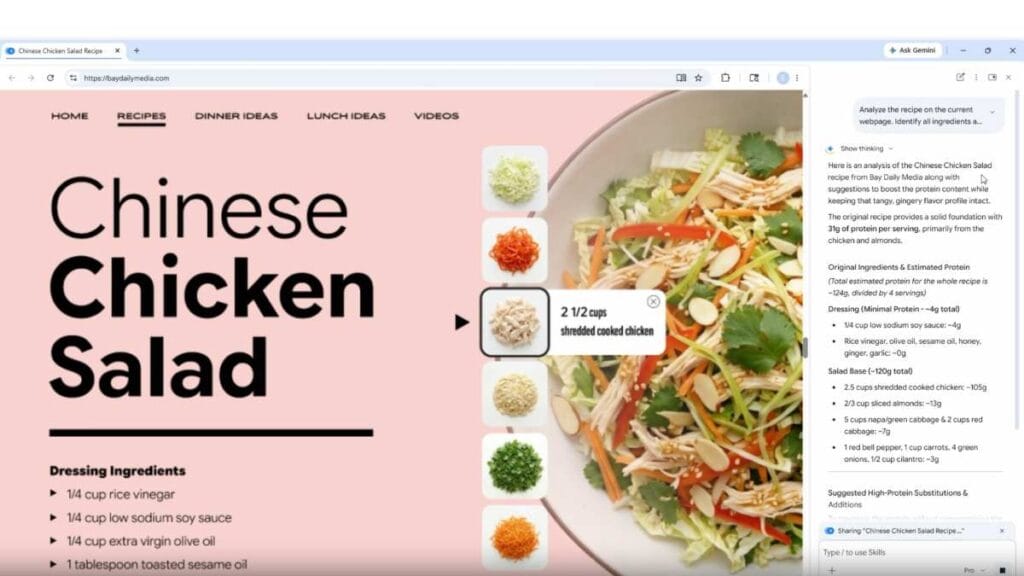
Here’s how users can use it:
- Ask Gemini something useful (e.g., “Summarize this page”)
- Save that prompt as a Skill
- Reuse it later by typing “/” or selecting it from the Skills library
The Skill can then run across multiple tabs simultaneously, making it powerful for research and multitasking.
Key Features of Chrome AI Skills
Save & Reuse Workflows
Users can convert any useful prompt into a reusable tool, eliminating repetitive typing.
Works Across Websites
Skills aren’t limited to one page; they can operate across different sites and tabs at once.
Pre-Built Skills Library
Google is also offering a library of ready-made Skills for common tasks like:
- Productivity
- Shopping comparisons
- Recipe modifications
Customizable Prompts
Users can edit and personalize Skills according to their needs.
One-Click Execution
Tasks that we once had to complete in multiple steps can now be done instantly with a single click.
Real World Use Cases
Early users are already applying Skills in practical ways:
- Students: Summarizing long articles or notes
- Business Owners: Comparing prices and analyzing competitors
- Health Enthusiasts: Tracking nutrition in recipes
- Content Creators: Generating ideas and outlines quickly
This makes Chrome not just a browser but a smart workspace.
Limitations (For Now)
- Currently rolling out for desktop users only
- Works best when Chrome is set to US English
- Some features may still feel experimental in early stages
Final Thoughts
Google’s new AI feature “Skills” in Chrome represents a shift from manual browsing to automated workflows. By turning prompts into reusable tools, users can save time, increase efficiency, and focus on more meaningful tasks.